

Why it matters
Most classrooms already run in groups. Setting them up in Banqer lets you find students fast and pay or charge a whole group in one go, so rewarding a team effort takes one click instead of a transaction for every student. Set them up once and reuse them all year.
How it works
Groups live in the Groups tab, under Students in the sidebar.
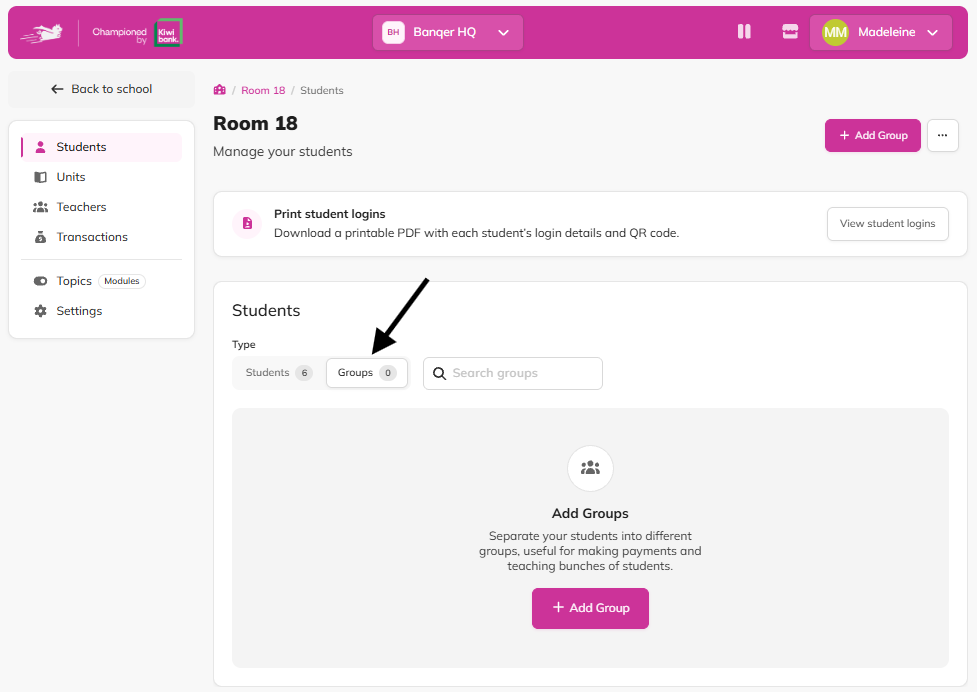
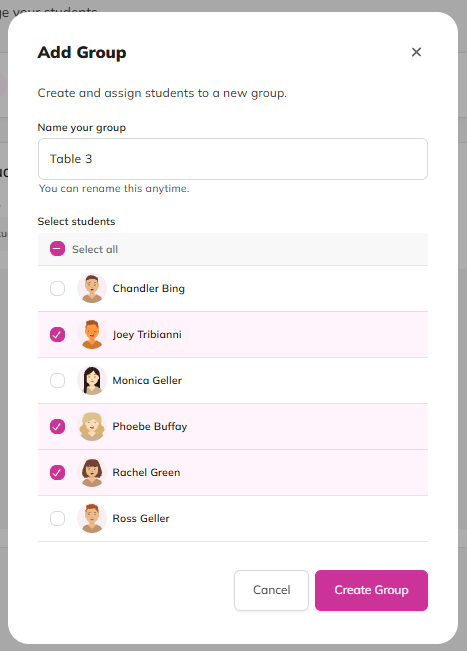
Create a group. Give it a name and choose the students in it. A student can be in as many groups as you like, so the same student can be in their reading group, their table group and their sports team.
Update it as your class changes. Rename it, add students or remove them, or delete the group altogether, at any time.
Find it fast. Search by the group’s name or by any student in it.
Pay or charge in one go. Tick one or more groups, enter the amount and a reason, and every student in them gets the same amount.
Example
At the start of term, Ms Tane sets up her four reading groups and five table groups in Banqer. On Friday, Table 3 wins the week’s tidy-up challenge, so she ticks “Table 3” on the Groups tab and pays each student $10 with the reason “Tidiest table”.
Flags
Students in more than one ticked group are paid for each group. Ticking “Table 3” and “Reading Champions” pays a student who’s in both twice. Great for stacking rewards, but worth a quick check before you confirm.
Deleting a group is safe. It only removes the group itself. Your students and their balances stay exactly as they are.
Groups tidy themselves. When a student leaves your classroom, they’re automatically taken out of their groups.