
Why it matters
It gives you a quick, calm way to get the whole class's attention, whether you're giving instructions, moving to the mat, or wrapping up for lunch. Students aren't distracted by Banqer while you talk, and nothing they were working on is lost.
How it works
When you pause, students see a Time to pause! 🐷 screen, with Coink the flying pig (Banqer’s mascot). You can add a short personalised message for them, like "Pens down, eyes on me!" If you don't, they'll see the default message "Eyes up to the front — back to Banqer soon!"
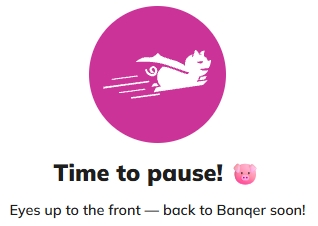
The pause screen appears straight away, even if a student is partway through something like a quiz. Students can't use Banqer until you resume, and they can use it again the moment you do.
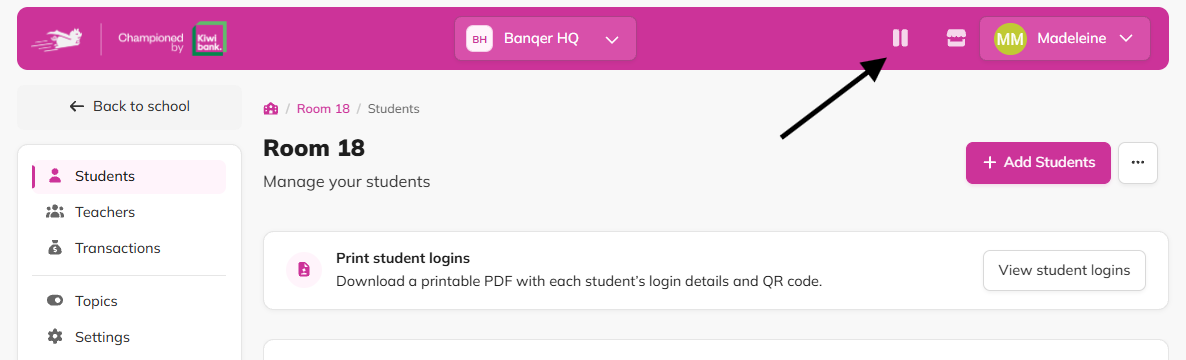
You can pause and resume from the top bar on any page of your Teacher Dashboard, or from the Classroom Status card in your classroom's Settings.
Example
Halfway through a Marketplace session, you need everyone on the mat to explain the next activity. You pause the classroom with the message "Come to the mat." Every screen switches to the pause message, and students come over. Ten minutes later you resume, and students pick up their shopping right where they left off.
Flags
Only screens are locked. Everything else, such as income, expenses and leaderboards keep running as normal while your classroom is paused.
A pause ends on its own after 4 hours, so if you forget to resume, your classroom unpauses automatically.