

Why it matters
Letting anyone quietly rewrite a balance or an amount would break the transaction history teachers and students rely on to see what actually happened. Reversing keeps a clear trail: both the original transaction and the correction stay visible, so nothing just disappears or silently changes.
How it works
From a student Transactions menu, you can either edit its reference or reverse it.
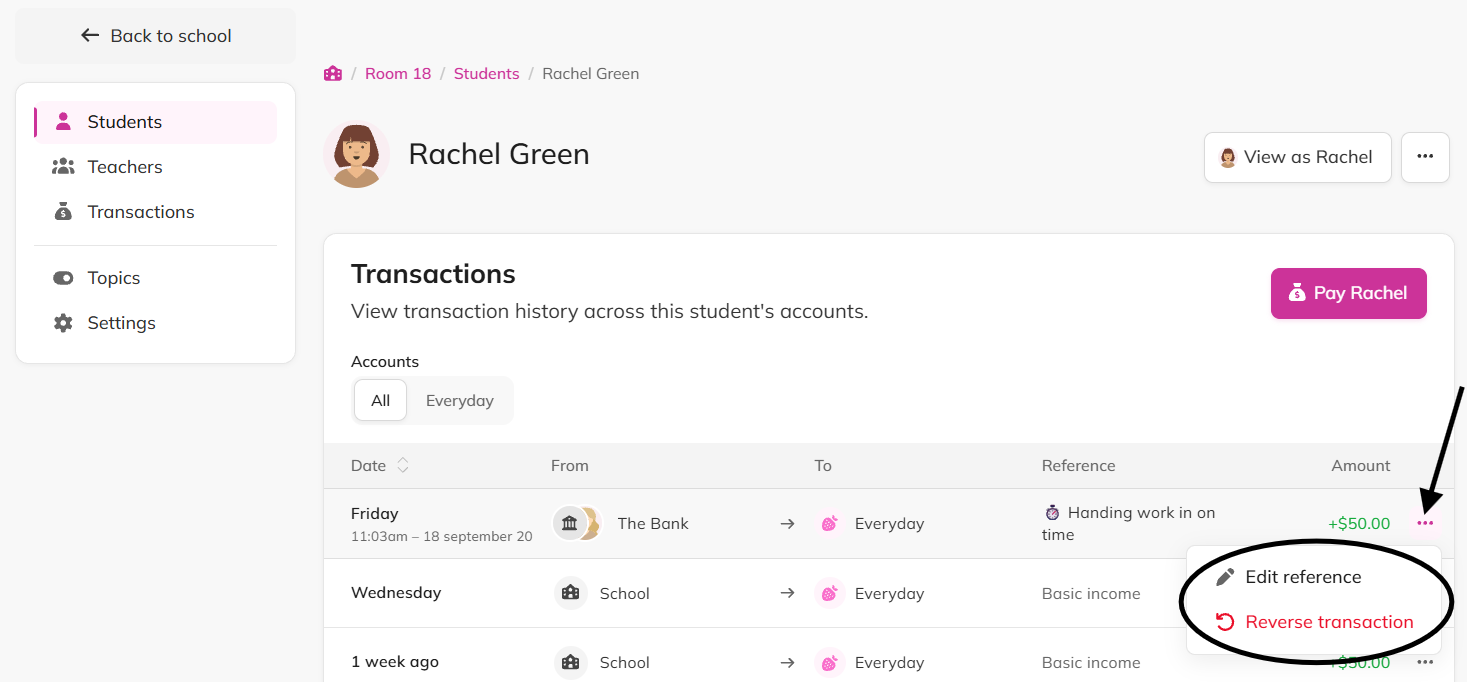
Editing the reference only changes the description text on that transaction. Every other detail (the amount, the accounts, the date) stays locked.
Reversing a transaction posts a brand new transaction, dated today, that undoes the original's effect on both accounts. The original stays in the history exactly as it was, marked as reversed, and the new reversal transaction appears alongside it.

Example
A teacher accidentally pays a student $50 instead of $5. They reverse the $50 payment, which returns the money to the classroom account, then pay the student the correct $5.
Flags
Reversing a transaction cannot be undone. Double-check before confirming, especially since the fix for a wrong reversal is a brand new transaction (rather than reversing the reversal).
There's no dedicated "edit balance" screen. If a student's balance is wrong because of a mistaken payment, reversing that payment and then posting the correct one is how you fix it.